![Logo - light.png]](https://success.territorium.com/hs-fs/hubfs/Logo%20-%20light.png?height=20&name=Logo%20-%20light.png)
Awards contain a visual representation of your achievement and can be shared with a potential employer or through social media.
Receiving your award
After you have completed the test or achievement, you will receive an email notification that a new award is added to your wallet.

1. Make sure you have downloaded and installed the LifeJourney app to your mobile device. When you click the link at the bottom of your email, you will be prompted to login.
2. After you login, click on the Wallet tool in the bottom menu. You will see your credential cards stacked to display the issuer, title and valid dates. Click on any card header to see more credential details and access the detail, share and delete tool icons. Also, on the Home page of your app, you will see your credential(s) designated as Pending Acceptance under the Claim button.
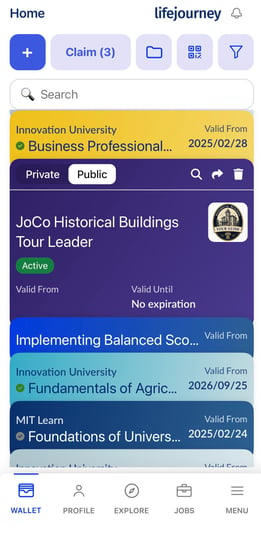
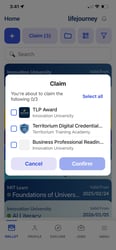
You quickly claim multiple awards by using the CLAIM button at the top.
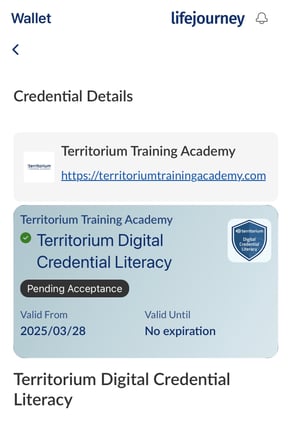
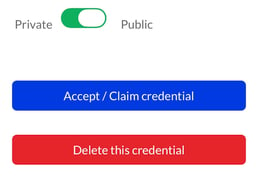
Access full credential details from any card in your wallet by clicking on the card header to access the magnifying glass icon ( ) . On the detail page, you can also accept a pending credential, delete a credential, and/or turn access to your badge off by sliding the public/private indicator.
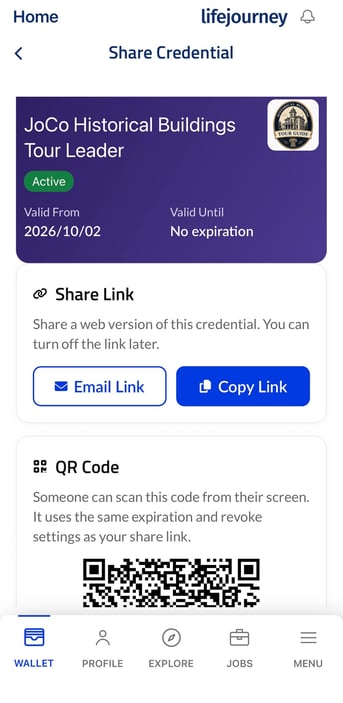
Sharing credentials from your mobile app wallet is accessible either through the arrow Share icon on any accepted credential ( )
)
and selecting one of the many sharing methods such as a direct link or QR code.
If the share arrow is greyed out that means your credential is not claimed yet, expired, revoked, OR marked private.
Your badge includes recognition for skills you have demonstrated through your performance on the test or achievement; these skills are valued by prospective employers and education institutions.