![Logo - light.png]](https://success.territorium.com/hs-fs/hubfs/Logo%20-%20light.png?height=20&name=Logo%20-%20light.png)
Awards contain a visual representation of your achievement and can be shared with a potential employer or through social media.
Receiving your award
After you have completed the test or achievement, you will receive an email notification that a new award is added to your wallet.

1. Login to LifeJourney by clicking the link at the bottom of your email, or at https://life.territorium.com.
2. After you login, click on Wallet > Credentials and you will see the badge(s) designated as Pending Acceptance on your Wallet dashboard.
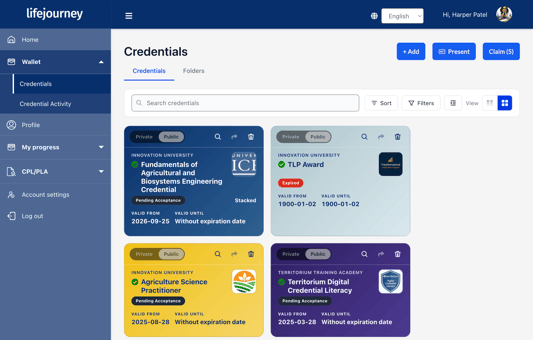
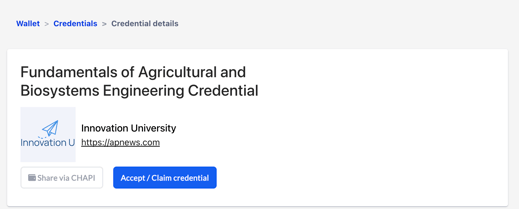
You quickly claim awards by using the Blue CLAIM button in the upper right-hand corner OR by opening an individual award with the magnifying glass icon ( ) and claiming it on the credential detail page.
Click on the Accept/Claim Credential button to complete adding the badge to your wallet.
You will then receive a completion screen and the badge will display in your wallet.

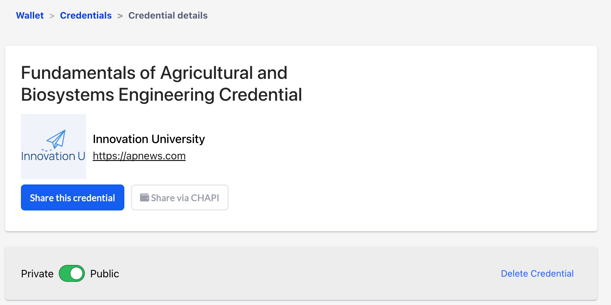
You may turn your badge off by sliding the public/private indicator.
Your badge includes recognition for skills you have demonstrated through your performance on the test or achievement; these skills are valued by prospective employers and education institutions.
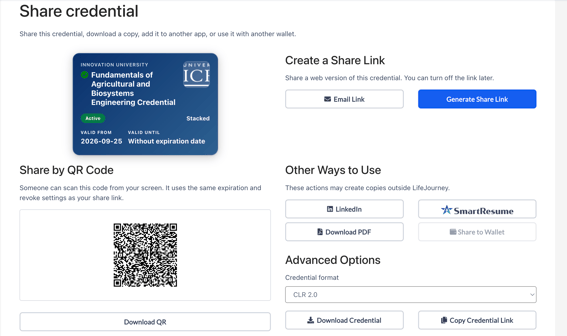
If you would like to share your badge, click on Share this credential, select from one of the available options.